10 Steps to Automate Supplier Risk Management
%202%20(1).png?width=40&height=40&name=20250501_1415_Professional%20LinkedIn%20Update_remix_01jt6gxkjmekavnvzsewk61z9w%20(1)%202%20(1).png)
TL;DR: Automating supplier risk management helps businesses identify and mitigate supply chain threats faster and more efficiently. By using AI-powered tools integrated with ERP systems, companies can monitor supplier activities, reduce manual tasks, and proactively address risks. This guide outlines ten actionable steps to implement automation, from setting goals to tracking metrics.
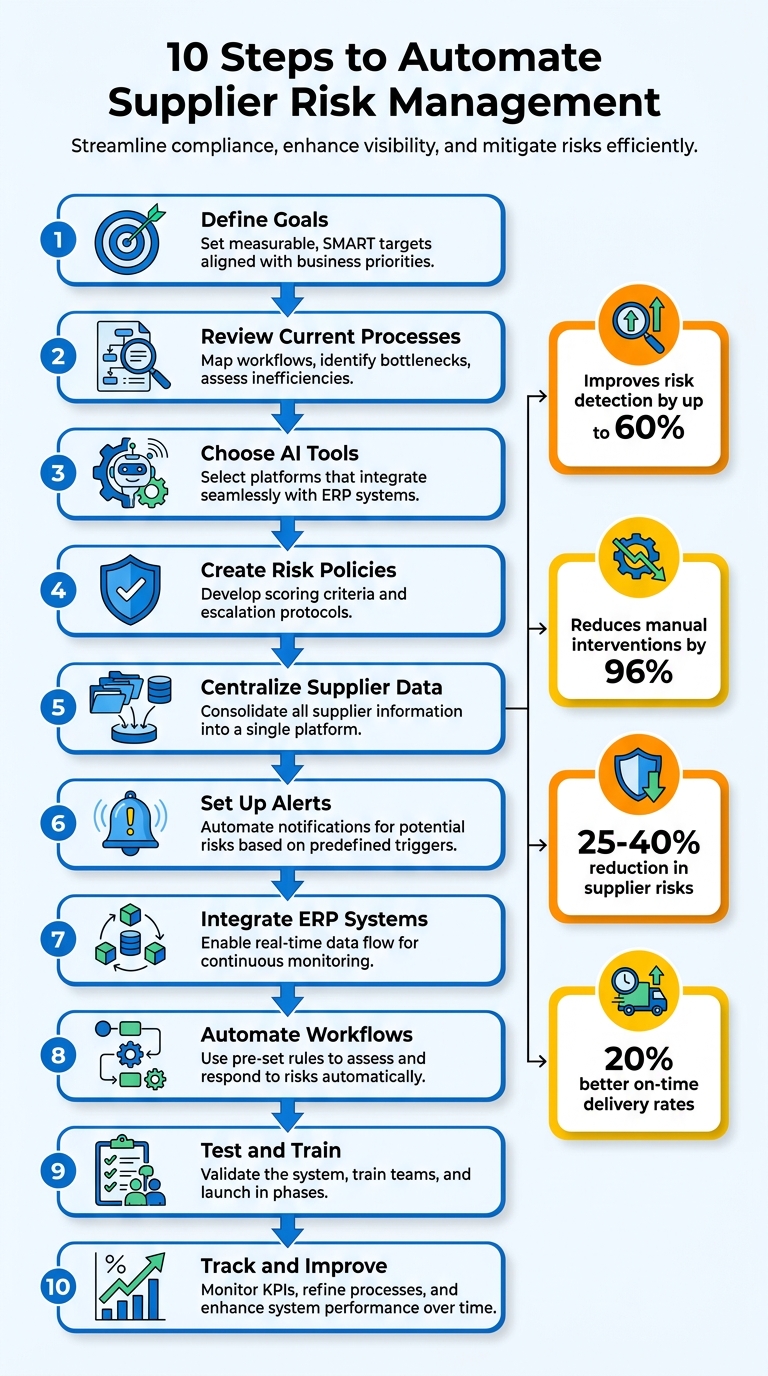
Managing supplier risks manually is outdated and inefficient. Automation, powered by AI and ERP integrations, transforms this process by providing real-time insights and reducing delays. Here's a quick breakdown of the ten steps to automate supplier risk management:
- Define Goals: Set measurable, clear targets aligned with business priorities.
- Review Current Processes: Map workflows, identify bottlenecks, and assess inefficiencies.
- Choose AI Tools: Select platforms that integrate seamlessly with ERP systems.
- Create Risk Policies: Develop scoring criteria and escalation protocols.
- Centralize Supplier Data: Consolidate all supplier information into a single platform.
- Set Up Alerts: Automate notifications for potential risks based on predefined triggers.
- Integrate ERP Systems: Enable real-time data flow for continuous monitoring.
- Automate Workflows: Use pre-set rules to assess and respond to risks automatically.
- Test and Train: Validate the system, train teams, and launch in phases.
- Track and Improve: Monitor KPIs, refine processes, and enhance system performance over time.
Automation not only saves time but also improves risk detection by up to 60%, reduces manual interventions by 96%, and enhances supply chain resilience. Start small with a pilot phase and expand as you see results.
10 Steps to Automate Supplier Risk Management Process
AI-Driven Third-Party Risk Management: Turning Vendor Data into Real-Time Intelligence
sbb-itb-b077dd9
Step 1: Set Your Risk Management Goals
Start by defining clear, measurable targets for your risk management strategy. Vague aspirations won’t cut it - your goals need to align with your business priorities and follow the SMART framework: they should be Specific, Measurable, Achievable, Relevant, and Time-bound.
Pinpoint your biggest challenges, whether it’s late deliveries or poor supplier communication, and quantify their financial or operational impact. For example, if manufacturing delays are costing $50,000 per day, you could aim for something like: "Reduce delays by 25% within six months using AI monitoring." Real-world examples back this up. In Q1 2024, Procter & Gamble automated 90% of supplier risk monitoring through AI-ERP integration, cutting incidents from 12% to 7.8% in six months and saving $45 million.
Typical goals might include reducing late deliveries to under 5%, automating 80% of risk assessments, or achieving full visibility into tier-1 and tier-2 suppliers to speed up mitigation. According to a 2024 Gartner report, organizations with defined risk goals saw mitigation times improve by 28% with AI automation. Unilever’s 2023 initiative is another great example: by setting goals for AI-driven risk automation, they reduced communication delays by 40% and boosted on-time delivery rates from 82% to 96% in just nine months. Procurement Director Lisa Green spearheaded this effort by integrating Oracle ERP for real-time alerts across 2,500 suppliers, cutting stockouts by 18% and saving $120 million in inventory costs.
Once your targets are defined, bring together key stakeholders to ensure everyone is on the same page. Collaboration between procurement, operations, and finance teams is essential. For instance, procurement might prioritize audit readiness, while operations focuses on delivery reliability. Use workshops to document team-specific goals, like "Procurement: 100% audit compliance" or "Operations: <5% delay rate." This process builds alignment and ensures your automation efforts can scale as your supplier network grows.
Lastly, establish baseline metrics before implementing any automation. Without knowing your current on-time delivery rate or average supplier risk score, you won’t be able to track improvements. Platforms like Leverage AI can integrate with your ERP system to provide real-time data on delays and supplier performance, giving you the foundation to set and measure your goals effectively.
Step 2: Review Your Current Risk Processes
Before diving into automation, you need a clear understanding of how things currently work. Start by mapping out every step in your supplier risk management workflow. This includes everything from onboarding new vendors to tracking their ongoing performance. Take note of the tools you're using - whether it's spreadsheets, emails, or an ERP system - and pinpoint where bottlenecks or duplicated efforts occur. A 2024 McKinsey Supply Chain Survey revealed that 61% of procurement leaders cite data silos as the biggest challenge to effective risk management. By thoroughly mapping your processes, you'll have a solid foundation for selecting the right automation tools.
One common issue many businesses face is the "black box" problem. Between submitting a purchase order and receiving goods, critical updates - like revised delivery dates, partial shipments, or product substitutions - often happen outside of formal systems. These updates frequently arrive via unstructured emails that ERP systems can't process or track. In fact, over 80% of mid-market suppliers still rely on email instead of EDI or portals, creating a visibility gap. This lack of transparency forces teams into reactive problem-solving rather than proactive risk management. Implementing AI-driven visibility can help shift this dynamic toward a more predictable supply chain.
Take a closer look at how much time your team spends on manual tasks. For example, a U.S. electronics manufacturer discovered that email-based follow-ups accounted for 40% of delays, with some going unnoticed for over two weeks. This resulted in $500,000 in production stoppages. When they reviewed their workflows, they found no centralized dashboard and significant redundancy across teams. To assess your own situation, track metrics like your on-time delivery rate, defect rates (aim for less than 2%), and the hours procurement teams spend chasing updates - non-automated teams often spend 15-20 hours per week on manual follow-ups.
Engage with stakeholders to uncover inefficiencies. Ask procurement, operations, and finance teams questions like: "What tasks take the most time?" "Where do errors typically occur?" and "When do we catch discrepancies - before or after goods arrive?" According to Gartner's 2023 research, companies using manual processes for risk management report error rates three times higher in supplier evaluations compared to those with automated systems. Use a simple scoring system (1-10 scale) to evaluate each process's efficiency, then prioritize addressing the gaps with the highest impact. For example, focus on high-volume suppliers where manual delays make up more than 10% of your supply chain costs.
AI-powered solutions can bridge these gaps by integrating directly with ERP systems, offering real-time tracking of supplier communications and performance data on a single platform. By understanding your current pain points and baseline metrics, you'll be better equipped to choose automation tools that deliver the most value. With these insights, you're ready to move forward with selecting the right AI and ERP tools to streamline your processes.
Step 3: Choose AI-Powered Tools with ERP Integration
After mapping out your processes, the next step is picking the right automation tool. The tool you choose must seamlessly integrate with your ERP system - whether it’s SAP, Oracle, Microsoft Dynamics, or NetSuite. Without this integration, you’re likely to face the same old issues of data silos and limited visibility that manual processes create. A 2024 Gartner report highlights that 78% of organizations using AI in supply chain management experience better risk visibility and respond to disruptions 25% faster. By tying your automation platform to your ERP, you can break down data silos and gain clearer insights.
Once ERP integration is in place, look for features that provide actionable data. Tools offering real-time supply chain visibility and supplier scorecards are particularly valuable. These features consolidate metrics like on-time delivery rates (aiming for over 95%), quality scores, and lead times into easy-to-read dashboards. Supplier scorecards, for instance, often weigh delivery reliability (40%), quality (30%), cost compliance (20%), and responsiveness (10%) to generate automated ratings from A to F. This data-driven system allows you to focus on top-performing suppliers while reducing risk exposure by up to 25%.
To ensure compatibility, test the platform’s pre-built APIs. It should handle data imports efficiently, deliver AI-driven risk predictions with over 90% accuracy, and support no-code workflows for creating custom risk rules.
Take the example of a manufacturing firm that implemented Leverage AI. By integrating it with their ERP system, they reduced supplier delays by 40% and cut manual follow-up tasks by 70%, saving $500,000 annually. The platform’s AI-powered tools for purchase order automation and supplier performance tracking worked seamlessly with multiple ERP systems, offering real-time data to manage risks proactively.
Before a full rollout, run a 30-day pilot with 10–20 key suppliers. This trial phase helps you verify data mapping accuracy, test automated alerts, and train your team - all without disrupting daily operations. Industry data shows that AI-ERP integration can reduce risk events by 35% and boost on-time delivery rates to 98% within six months. While initial integration costs range from $10,000 to $50,000, most companies recover their investment within 3–6 months through fewer manual audits and quicker problem resolution.
When evaluating platforms, prioritize those with mobile access and vendor-agnostic integrations that support hybrid cloud setups. This technology is no longer a luxury - it’s a necessity. In fact, 65% of manufacturers now prioritize ERP-integrated AI tools, with adoption growing 30% year over year.
Step 4: Create Risk Policies and Scoring Criteria
Once you've chosen your automation platform, the next step is to establish a framework for evaluating suppliers. Without clear policies and scoring criteria, even the most sophisticated AI tool won't deliver consistent results. Start by defining the metrics you’ll measure, their relative importance, and the thresholds that will trigger alerts. This structure allows you to assess and manage supplier risks effectively.
Supplier risk can typically be divided into five main categories:
- Financial: Includes risks like potential bankruptcy or cash flow problems.
- Operational: Covers factors such as delivery reliability and production capacity.
- Compliance: Involves adherence to standards like ISO certifications or avoiding regulatory violations.
- Geopolitical: Accounts for risks like trade sanctions or political instability in a supplier's country.
- Reputational: Looks at ESG scores and any negative media coverage.
By assigning weights to these categories - such as Financial at 30%, Operational at 25%, Compliance at 20%, Geopolitical at 15%, and Reputational at 10% - you can tailor the framework to your industry. For instance, a pharmaceutical company might prioritize Compliance more heavily than an electronics distributor.
Next, define risk thresholds:
- Low: 0–3 points
- Moderate: 4–6 points
- High: 7–10 points
Set clear escalation protocols tied to these thresholds. For example, Moderate risks should reach a manager within 24 hours, while High risks should escalate to a VP within 48 hours. This approach ensures timely responses through SLA-based escalation.
Your policies should also account for routine variances to avoid unnecessary alerts. For instance, set automated flags for price deviations of ±3–5% (or $25), quantity changes of ±2–3%, and delivery delays exceeding 2 days for standard items (or 0 days for critical parts). Tighten these tolerances for strategic suppliers to safeguard key relationships, while allowing more flexibility for less critical vendors to minimize alert fatigue.
Finally, ensure clean data by requiring essential fields - such as Supplier ID, SKU, quantity with unit, unit price, and delivery windows - at the time of purchase order creation. Sharing your scoring criteria with suppliers promotes transparency and helps them understand how to improve their performance.
Step 5: Consolidate Supplier Data in One Platform
Scattered supplier data creates major blind spots that can derail automation efforts. According to a 2023 Gartner study, 62% of organizations lack a unified supplier database, resulting in $1.5 trillion in annual global losses from unmanaged risks. The solution? Start by auditing every source where supplier data resides.
Check all locations where supplier information is stored - ERP systems, procurement software, email threads, shared drives, and personal files. Then, consolidate profiles, performance records, and risk indicators into one cohesive platform. For example, in Q1 2023, Procter & Gamble streamlined supplier data from over 50 legacy systems into SAP Ariba. This move eliminated silos, provided 99% real-time visibility across 80,000 suppliers, reduced supply disruptions by 22%, and saved $150 million.
To make this work, ensure your chosen platform integrates seamlessly with your ERP system using APIs. AI tools can sync with systems like SAP and Oracle, centralizing supplier data, automating follow-ups, and enabling real-time performance tracking - all while cutting consolidation time in half. Standardizing your data is equally important. For U.S. operations, use MM/DD/YYYY for dates, USD ($) with proper formatting (e.g., $1,234.56), and imperial units. Also, align key purchase order fields like Supplier ID, SKU, quantity, unit price, and delivery windows to avoid gaps.
Once your data is centralized, tackle high-risk suppliers first - those tied to single-source dependencies or accounting for 80% of your spending. AI-powered deduplication can clean up duplicate entries and enhance supplier profiles by pulling in external credit score data via API. Coca-Cola European Partners demonstrated this in 2022 by consolidating 25,000 supplier records into Coupa, integrated with Oracle ERP. The result? On-time performance jumped from 82% to 96%, and risk assessment time dropped by 45%.
To protect this data, implement role-based access controls, encrypt sensitive information using AES-256, and maintain audit logs. Companies that centralize supplier data report 25-40% faster risk identification and a 30% drop in supply disruptions. By turning fragmented data into actionable insights, you’ll not only strengthen your supply chain but also set the stage for AI-driven risk monitoring and mitigation.
Step 6: Set Up Automated Risk Monitoring and Alerts
Once supplier data is consolidated, the next step is to implement automated alerts to quickly identify and address risks. Manual tracking just doesn’t cut it anymore, especially with today’s complex supply chains. Between 2023 and 2024, there was a staggering 49% increase in third-party-related security breaches, with 61% of companies affected. On top of that, 84% of organizations reported operational disruptions due to overlooked vendor risks. Automated monitoring systems can help tackle these challenges head-on by flagging potential issues as they arise.
Start by determining the triggers for these alerts, tailored to your risk tolerance. For example, vendors with risk scores exceeding 75 should prompt immediate notifications. Alerts should also cover dynamic risks like ownership changes, security incidents, expired certifications (e.g., SOC 2 or ISO 27001), and compliance violations. Additionally, configure triggers for unexpected events, such as scope expansions or reported breaches, to ensure your team can act before small problems snowball into major disruptions.
Your monitoring system should pull data from various sources, including credit bureaus, news feeds, regulatory databases, and your ERP system. Platforms like Leverage AI (https://tryleverage.ai) can integrate with ERP systems to track real-time metrics like delivery times, quality, and payment history. When thresholds are breached, these systems can automatically initiate risk reassessments and notify procurement managers.
To ensure a smooth response, set up clear escalation paths based on the severity of risks. For instance, minor issues might alert a procurement specialist, while more serious concerns - like regulatory violations - should escalate to senior management. Adam Hardy, Internal Audit Manager at TopBuild, highlighted the importance of efficient risk communication:
"Sharing information with the external auditors, once it's gone through our review, is streamlined and seamless and actually functions the way that you would expect it to".
Automated notifications not only streamline responses but also lay the groundwork for deploying automated workflows and continuous monitoring.
Finally, test your alert system using historical scenarios. Simulate events like supplier bankruptcies, quality issues, or compliance failures to confirm that notifications are sent to the right people at the right time. Fine-tune thresholds to reduce false positives, ensuring alerts remain effective and actionable.
Step 7: Connect Your ERP System for Real-Time Data
After setting up automated alerts in Step 6, the next step is to integrate your ERP system for real-time risk insights. This integration shifts your supply chain data access from occasional manual updates to live, continuous visibility. With this setup, you can quickly spot risks like delayed shipments or low inventory levels - often within minutes.
The technical process is relatively straightforward. Using the process mapping and tools from earlier steps, follow these steps for API integration:
- Obtain API credentials and configure the necessary endpoints.
- Map critical fields such as supplier IDs, purchase order (PO) numbers, order dates (formatted as MM/DD/YYYY), expected delivery dates, unit costs (in USD), and quality rejection rates.
- Use tools like Leverage AI, which integrates seamlessly with ERP systems like SAP, Oracle NetSuite, and Microsoft Dynamics 365. This eliminates the need for custom coding, as it pulls live PO data directly.
Authentication typically involves OAuth or API keys. After setup, test the data sync using sample queries, then enable webhooks for real-time updates. This live connection is essential for proactive risk management and supports the broader goal of fully automating supplier risk monitoring.
Example in Action: A mid-sized manufacturer paired Leverage AI with Oracle NetSuite to automate alerts for suppliers experiencing delays of more than seven days. This reduced supply disruptions by 25% and improved on-time delivery rates to 95%. Similarly, real-time alerts for late shipments resulted in automated follow-ups, boosting on-time delivery rates by up to 30% in other manufacturing firms.
Before launching, test the integration by syncing historical POs, simulating delays, and verifying that alerts trigger within five minutes. Tools like Postman can validate API functionality, ensuring a 99% data match rate.
To protect sensitive supplier data, ensure encrypted transfers using TLS 1.3 and implement role-based access controls. Starting with read-only access is a safer approach, as experts suggest scaling to bidirectional sync only after thorough validation. This approach aligns with NIST guidelines for secure data management.
Step 8: Build Automated Workflows for Risk Assessment
Once your ERP system is connected and supplying real-time data, it's time to create automated workflows that assess supplier risks and trigger mitigation measures. These workflows operate on pre-set rules, removing the need for manual reviews and enabling immediate responses to changes. By leveraging real-time ERP data, you can act quickly to address potential risks.
Start by defining risk scoring criteria using measurable metrics. For instance, you might set targets such as on-time delivery rates above 95%, a current financial ratio above 1.5, and quality defect rates under 2%. Assign weights to these metrics - like 40% for delivery performance, 30% for financial stability, and 30% for quality metrics - and use these weighted scores to calculate supplier risk in real-time.
Next, configure automated triggers and actions based on these scores. For example, if a supplier's score falls below 70 out of 100, the system could escalate the issue to your procurement team. A delivery delay exceeding three days might deduct 20 points from the supplier's score and automatically send a corrective action request via email. In cases of severe financial instability, the system could reduce order volumes by 50% and notify the finance team.
Platforms like Leverage AI can simplify this process further. These tools integrate directly with ERP systems such as SAP and Oracle, pulling performance data, tracking purchase orders, and executing predefined actions. Using low-code workflow builders, you can connect specific triggers (e.g., late shipments) to automated responses (e.g., halting high-risk purchase orders or shifting orders to backup suppliers). Before rolling out these workflows, test them with historical data - for example, simulate a 10% supplier failure rate and confirm that your system responds correctly at least 95% of the time.
Finally, clarify roles and responsibilities using the RACI framework. Procurement teams should define the rules, IT teams handle ERP integrations, risk managers set scoring criteria, and executives monitor dashboards. Document these roles to ensure accountability and prevent delays as your automated system grows.
Step 9: Test, Train, and Launch the System
Thorough testing is a must to identify vulnerabilities and ensure your system performs as expected. Start with data quality validation - confirm that your ERP feeds are accurate, eliminate duplicate supplier records, and ensure schema contracts align with your predefined KPIs, such as on-time delivery rates and unit price trends. As IBM emphasizes:
"AI models are only as reliable as their training data. Distorted or biased data can lead to false positives, inaccurate outputs or poor decision-making".
This step ensures your system won't make decisions based on flawed or incomplete data.
Security testing is just as important. Shockingly, only 24% of generative AI projects are adequately secured, while 96% of leaders believe AI adoption increases the risk of security breaches. Conduct penetration tests to uncover vulnerabilities like prompt injection or data poisoning. With supply chain attacks averaging $4.91 million per incident, thorough security audits are essential to avoid these costly breaches. Tailor the depth of your testing to the system's criticality - more rigorous assessments are necessary for systems that impact financial or compliance decisions. This process ensures your AI-driven risk management system is dependable.
Once testing confirms reliability, it’s time to prepare your teams. Train procurement, IT, and risk management teams on the new workflows, using real-world scenarios like delayed shipments or financial instability to demonstrate system responses. Provide clear documentation for escalation and troubleshooting, enabling teams to manage issues independently. With training complete and procedures in place, you're ready to roll out the system.
Start with a phased launch to minimize disruptions. Begin with a pilot phase that includes a mix of suppliers across various risk levels and product categories. Monitor performance using key metrics like alert accuracy and response times. Christine Andrews and Romain Menini from Dataiku highlight the importance of this step:
"To move from a demo to production, the agent needs to be hardened around clear workflows, strong data foundations, and a modular design".
Once you’ve validated the system’s performance and resolved any issues, expand the rollout to your entire supplier base. Keep existing processes in place as a backup during this transition to ensure a smooth shift.
Step 10: Track Metrics and Improve Over Time
Once your system is live and workflows are automated (as outlined in Step 9), the focus shifts to continuous improvement. This step is all about tracking performance and refining your processes by monitoring 5-7 key performance indicators (KPIs). Examples include:
- Supplier on-time delivery rate: Aim for a target above 95%.
- Alert response time: Strive to resolve issues within 24 hours.
- Supply chain disruption rate: Keep this below 3% on a monthly basis.
These metrics are the bridge between deploying your system and ensuring its long-term success.
Set Up Real-Time Dashboards
Use tools like AI-powered dashboards to monitor these KPIs in real time. Pull live data from your ERP system to track metrics such as delivery accuracy percentages, cost variances (e.g., $50,000 saved), and compliance scores. Display this data in formats that make sense for your team, allowing you to spot and address issues before they escalate.
For example, if on-time delivery rates dip below 95%, your dashboard should flag the issue immediately, enabling quick action. This proactive approach helps you maintain smooth operations and avoid costly disruptions.
Establish a Regular Review Schedule
Create a structured review process to analyze your system's performance and pinpoint areas for improvement:
- Weekly reviews: Focus on critical alerts and immediate issues.
- Monthly deep dives: Assess all KPIs in detail to uncover trends.
- Quarterly strategy sessions: Reassess goals and adapt to new risks.
During these reviews, categorize your metrics into three groups:
- Keep: Metrics performing well (e.g., delivery rates consistently above 95%).
- Improve: Metrics needing adjustment (e.g., refining scoring for emerging risks).
- Remove: Outdated or irrelevant metrics that no longer add value.
This approach ensures your system stays relevant and avoids becoming cluttered with unnecessary data.
Automate Improvements Based on Metrics
Take your tracking a step further by using metrics to trigger automated actions. For instance, if a supplier's delivery performance falls below your threshold, your system could:
- Automatically generate a supplier scorecard.
- Initiate follow-up communications.
- Flag the issue for immediate attention.
You can also re-train your risk scoring models quarterly using updated performance data. This helps improve prediction accuracy and keeps your system aligned with actual conditions. One manufacturer saw a 40% reduction in supply disruptions and saved $200,000 annually by automating follow-ups tied to on-time delivery metrics.
Document Progress and Benchmark Against Industry Standards
Keep a central repository to document every improvement you make. Compare your progress to industry benchmarks, aiming for 10-15% year-over-year growth in your core KPIs. Remember, the goal isn't to achieve perfection right away. Instead, focus on building a system that learns and improves with every data point it processes.
Conclusion
By following these 10 steps, you can shift supplier risk management from a reactive hassle to a proactive, data-driven strategy. With actions like setting clear objectives, reviewing current workflows, and leveraging AI-powered tools, you lay the groundwork for smarter risk mitigation. Incorporating risk policies, consolidating supplier data, and automated monitoring ensures your approach is both comprehensive and forward-thinking. Add elements like ERP integration and intelligent workflows, and you'll transform your operations into a model of strategic oversight. Finally, by testing your system and tracking key metrics, you pave the way for ongoing improvement and measurable results.
This method doesn’t just streamline risk management - it delivers real operational gains. For example, mid-market manufacturers and distributors that integrate automation with ERP systems often achieve 25-40% reductions in supplier risks and see 20% better on-time delivery rates. These are not just numbers - they're competitive advantages that directly affect profitability.
Leverage AI brings all these capabilities into one platform, designed to integrate smoothly with your existing ERP system. It automates tasks like purchase order follow-ups, supplier performance tracking, and real-time data analysis, giving you actionable insights without the need for a large IT team. Its AI-powered dashboards and customizable workflows let you start small and expand as your needs grow.
Now is the time to act. Supply chain disruptions are becoming more frequent, and manual processes just can’t keep up. By starting with an assessment of your current risk processes (Step 2) and exploring ERP-compatible AI tools, you can take the first step toward a more resilient supply chain. Even piloting a single automated workflow - like tracking supplier performance or setting up delay alerts - can deliver quick results and build momentum for larger changes.
Turn supplier risks into manageable, data-driven decisions. The 10 steps outlined here are your roadmap, and tools like Leverage AI are ready to help you bring this vision to life.
FAQs
What supplier data do I need before automating risk management?
To streamline supplier risk management, certain types of data are critical. These include performance metrics, financial health indicators, external risk elements, delivery reliability, quality standards, and compliance records. Key details like delivery accuracy, quality performance, and financial stability allow for dynamic risk assessments and timely alerts. Keeping an eye on external factors, such as weather conditions or logistics disruptions, ensures AI tools can assess risks effectively and enhance automated processes.
How do I safely integrate AI risk monitoring with my ERP?
To integrate AI risk monitoring with your ERP system effectively, opt for AI tools designed to work effortlessly with your existing setup. These tools should support real-time data exchange and automated workflows, ensuring your operations stay efficient and up-to-date. Look for solutions that emphasize data security, compliance, and structured updates to maintain a secure and reliable connection.
With these systems in place, you can automate tasks like supplier tracking, risk notifications, and performance monitoring. At the same time, you'll reduce potential risks, such as data breaches or errors that could occur during the integration process.
How do I prevent too many false alerts once automation is live?
To cut down on false alerts, set clear exception tolerance thresholds to account for minor variances and avoid excessive notifications. Incorporate AI tools to enable dynamic risk scoring and real-time monitoring, which can help filter out false positives and highlight the most critical issues. Make it a habit to review and fine-tune alert thresholds regularly, using historical data and supplier performance insights, so notifications remain focused on addressing genuine risks.