Manual vs. Automated Purchase Order Processing
.png?width=40&height=40&name=elizabeth-anderson-square%20(1).png)
TL;DR:
Manual purchase order processing is slow, costly, and prone to errors, while automation reduces costs, speeds up workflows, and improves accuracy. Automated systems use AI to process orders in hours instead of days, cut error rates to under 2%, and save up to 80% in costs per order. For businesses managing high volumes, automation is a game-changer for efficiency and compliance.
Manual purchase order (PO) processing relies on spreadsheets, emails, and paper forms, which often lead to delays, errors, and inefficiencies. On average, manual PO processing costs $527 per order, takes 5–7 days, and has an error rate of 15–25%. These issues result in higher costs, slower operations, and compliance risks.
In contrast, automated systems streamline the entire PO process using AI and machine learning. Automation reduces costs to $105 per order, processes orders in 2–4 hours, and cuts error rates to just 1–2%. Features like real-time tracking, three-way matching, and predictive analytics make automation faster, more accurate, and scalable. Businesses using automation also benefit from better compliance, reduced risks, and significant time savings.
Quick Comparison:
| Factor | Manual PO Processing | Automated PO Processing |
|---|---|---|
| Cost Per Order | $527 | $105 |
| Processing Time | 5–7 days | 2–4 hours |
| Error Rate | 15–25% | 1–2% |
| Compliance Risks | High | Low |
| Efficiency | Labor-intensive | AI-driven, minimal effort |
For businesses handling high transaction volumes, automation is the clear choice for reducing costs, improving accuracy, and freeing up teams for more strategic tasks.
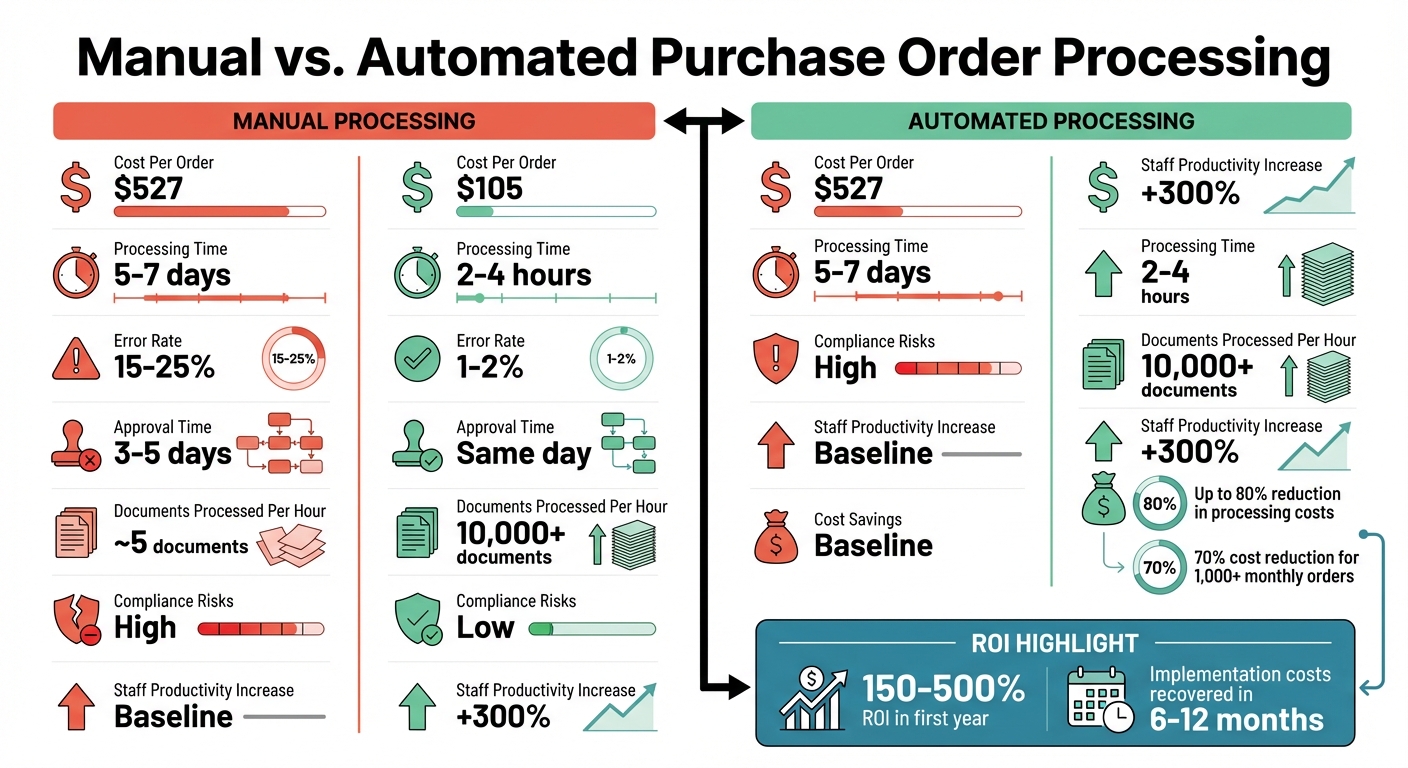
Manual vs Automated Purchase Order Processing: Cost, Speed, and Accuracy Comparison
PO Processing AI Agent | Purchase Order Automation for Manufacturers
Manual Purchase Order Processing Explained
Manual purchase order (PO) processing relies on paper forms, spreadsheets, and email to manage orders from start to finish. Despite its inefficiencies, 67% of supply chain managers still use Excel for parts of their operations, and 75% of purchase orders are sent via email or fax. This reliance often comes down to familiarity with these tools and a failure to recognize the hidden costs of sticking to outdated methods.
Steps in Manual Purchase Order Processing
The manual process starts with staff creating a requisition, either on paper or in a spreadsheet, listing the required items, quantities, and justifications. This document is then sent to managers or department heads for approval, often through email, fax, or even physical delivery.
Once approved, the purchasing team manually enters the details into a system - usually a word processor or spreadsheet - to generate a formal purchase order with a unique PO number. The PO is then sent to the supplier via email or fax, and follow-up is required to confirm receipt. When the order arrives, the receiving team checks the items against the packing slip and the original PO, noting any discrepancies or damages. Finally, the transaction is recorded manually in the financial system, marking the PO as complete.
This process is riddled with inefficiencies, leaving room for errors and delays at nearly every step.
Problems with Manual Processes
Manual PO workflows create a range of operational headaches. For instance, 62% of finance and procurement professionals cite approval delays as the main source of inefficiency. Important documents often get lost in email threads, creating silos that disrupt coordination between procurement, finance, and compliance teams. Without real-time tracking, it's challenging to monitor budgets, inventory, or order statuses accurately.
The financial toll is equally concerning. Manual data entry errors occur at rates of 1%–2%, with each error costing up to $53 to correct in staff time. Around 30% of PO discrepancies are caused by these manual processes. Additionally, 49% of businesses require at least two people to approve procurement documents manually, further slowing the process.
"Manual PO processing may depend on improperly scanned documents, transfer of information between emails, spreadsheets and other tools, and data lost in incompatible silos. This is a perfect recipe for errors, lapses and delays." - Sage
The risks don’t stop at inefficiency. Manual systems are vulnerable to compliance and fraud issues. Paper-based processes lack robust controls, making it easier for documents to be stolen, duplicated, or tampered with. Without a clear audit trail, tracing decisions or verifying compliance during audits becomes a major challenge. These inefficiencies can lead to missed early payment discounts, delayed shipments, higher inventory costs, and strained vendor relationships due to payment uncertainties.
How Automated Purchase Order Processing Works
Automated purchase order systems take the hassle out of managing spreadsheets and emails by using AI, machine learning, and RPA to streamline the entire process. These platforms integrate directly with ERP systems like SAP, Oracle, NetSuite, or Microsoft Dynamics, automating tasks such as requisitions, purchase orders, and invoice matching. This integration lays the groundwork for smoother workflows and improved efficiency.
Unlike manual methods that are prone to errors and delays, automation digitizes each step for greater reliability. AI plays a central role here, with technologies like Optical Character Recognition (OCR) transforming supplier documents into digital formats and Natural Language Processing (NLP) extracting critical details such as SKUs, prices, and delivery dates. The system cross-checks this data against ERP master records to ensure accuracy. If discrepancies or unclear information arise, only those exceptions are flagged for human review, allowing your team to focus on genuine issues.
Core Features of Automation
These automated systems come packed with features designed to replace tedious manual processes. Intelligent requisition processing can auto-fill forms, categorize purchases, and even recommend vendors based on past transactions. Dynamic approval workflows ensure purchase orders are routed to the right decision-makers, with automatic escalation when approvals are delayed. Real-time notifications provide detailed updates for each PO, enabling faster decision-making.
Vendor integration is another standout feature. Orders and status updates are transmitted instantly, eliminating the need for back-and-forth emails or calls. Suppliers can confirm orders directly from embedded emails with a single click, while automated reminders help keep lead times on track. The system also tracks open orders and sends regular updates to stakeholders.
Predictive analytics take things a step further, offering tools for spend forecasting, budget tracking, and evaluating supplier performance. Instead of waiting for end-of-month reports, you get real-time insights into spending trends, helping to spot potential budget issues early. Over time, the AI learns from historical data, improving demand forecasting and inventory management.
Benefits of Automation
The benefits of automating purchase order processes are hard to ignore. Processing times drop from days to mere hours, approval cycles can be completed in the same day, and error rates plummet from as high as 25% to just 1–2%. Teams see a productivity boost of up to 300% as they shift from repetitive data entry to more strategic tasks like building vendor relationships.
Invoice processing accuracy reaches an impressive 99.8%, virtually eliminating the costly errors often associated with manual three-way matching. For example, a company managing $10 million in accounts payable could face $200,000 in discrepancies with a 2% error rate - issues that automation can nearly eradicate.
Automation also strengthens compliance. It enforces purchasing policies, creates detailed audit trails, and simplifies regulatory reporting for frameworks like SOX and GDPR. In fact, 75% of businesses report better tracking of spending and budget monitoring after automating their purchase order processes. Plus, as the AI processes more orders, it continues to refine its performance, becoming even more efficient over time.
Manual vs. Automated: A Direct Comparison
When you stack manual purchase order processing against automated systems, the differences are striking - especially in areas like data validation, speed, and error reduction. Manual methods rely heavily on repetitive tasks like copying and re-entering data from emails and PDFs. This not only slows things down but also increases the chance of errors. Automated systems, however, use AI and machine learning to digitize and validate data, flagging issues before they spiral into bigger problems. This builds on earlier discussions about the challenges of manual processes.
The time savings alone are eye-opening. Manual processing typically takes 5–7 days, while automated systems can handle the same workload in just 2–4 hours. Approval times shrink from 3–5 days to same-day processing, and error rates drop dramatically from 15–25% to a mere 1–2%. This isn’t just about shaving off a few hours - it’s a major shift in how procurement teams operate.
Error Rates: Manual vs. Automated
Let’s dig into error rates and their impact on both finances and operations. Manual data entry comes with an error rate of about 1.6% per invoice or purchase order, and fixing each mistake costs around $53. Duplicate payments, a common issue in manual workflows, occur in roughly 2% of cases. Fixing just one duplicate payment can cost over $350.
| Factor | Manual Process | Automated Process |
|---|---|---|
| Average Error Rate | 1.6% per document | Less than 0.1% |
| Common Error Sources | Data entry, mismatched POs, duplicate entries | System exceptions only |
| Cost to Rectify Error | $53 per error | Minimal (flagged in real time) |
| Duplicate Payments | ~2% of cases | Near 0% (via automated validation) |
Automated systems also excel in straight-through processing, achieving success rates of about 80% for routine orders. Compare this to traditional rules-based automation, which only manages 40–60%. This means most purchase orders are processed without human involvement, freeing up your team to focus on exceptions that truly need their attention.
Efficiency and Time Savings
Manual workflows demand a lot of time - about 12–15 minutes of hands-on effort per document. Automation cuts that to under 5 minutes. Total cycle times also plummet, dropping from 8–12 hours of labor to just 15–30 minutes. In fact, automation can reduce overall processing time by as much as 80–90%.
This boost in efficiency has a direct impact on productivity. Companies that switch to automation report a 300% increase in staff productivity. Why? Because teams can shift their focus from tedious data entry to higher-value tasks like managing vendor relationships and optimizing sourcing strategies. While manual processing handles around 5 documents per hour, automation can process over 10,000. These gains don’t just save time - they significantly cut costs.
Cost Comparison
The cost difference between manual and automated processing is substantial. Industry data shows that manual purchase order processing costs between $125 and $200 per order. This varies based on factors like company size and process complexity. By contrast, AI-driven automation slashes this cost to just $15–$35 per purchase order.
| Cost Category | Manual PO | Automated PO |
|---|---|---|
| Direct Cost per Document | $125–$200 | $15–$35 |
| Labor Contribution | 60%–80% of total cost | Minimal (exception handling only) |
| Operational Overhead | $12–$30 (paper, storage, postage) | Near zero (cloud-based) |
| Approval Cost | Each manual step adds $8–$15 | Automated routing based on policy |
For businesses processing over 1,000 invoices or purchase orders each month, the savings are massive - up to a 70% reduction in costs with automation. Beyond labor savings, automation helps companies capture early payment discounts (typically 1%–3%) and avoid late payment penalties. Many organizations report a 150%–500% return on investment within the first year, often recovering implementation costs in just 6–12 months.
sbb-itb-b077dd9
Risk Management and Compliance
Relying on manual purchase order processing can leave your organization vulnerable to financial and regulatory risks. One of the biggest challenges is the lack of proper audit trails. Without clear documentation of who approved what and when, meeting regulatory requirements like SOX and GDPR becomes extremely difficult. Physical files and email-based approvals only add to the chaos, creating fragmented records that make compliance audits a logistical nightmare.
Risks in Manual Processes
Manual systems bring a host of issues to the table: duplicate orders, pricing errors, incorrect vendor data, and even bypassed approvals. Nearly half of businesses face delays because dual approvals are routed through disconnected systems, causing critical orders to stall.
Another major blind spot is vendor risk management. Without automated tools, it’s hard to monitor supplier performance or assess compliance risks efficiently. For manufacturers and distributors managing intricate supply chains, this lack of visibility can lead to missed quality standards or regulatory lapses. On top of that, communication breakdowns are common - purchase orders get lost in email threads, suppliers fail to acknowledge requests, and delays are often discovered only after a missed delivery deadline.
These issues underline the pressing need for a system that ensures compliance while minimizing financial risks.
How Automation Reduces Risk and Ensures Compliance
Automation tackles these challenges directly by digitizing the entire purchase order process. It creates comprehensive transaction records with timestamps and user details at every step. This digital audit trail not only meets regulatory requirements but also simplifies compliance reviews. Automated policy validation ensures violations are caught before they happen, and real-time budget monitoring prevents overspending on the spot rather than uncovering it later during reconciliation.
The benefits are clear and measurable. Automation slashes error rates from 15–25% to just 1–2%, representing a 90% drop in processing mistakes. Tools like three-way matching automation enable 85–95% straight-through processing, compared to only 40–60% with manual methods. Real-time dashboards offer instant visibility into spending and predictive analytics for better budget forecasting. These features allow organizations to catch policy breaches and supplier performance issues as they happen, not after the fact.
Leverage AI for Purchase Order Automation
Managing purchase orders manually can lead to errors and inefficiencies, especially for manufacturers and distributors dealing with high volumes. Leverage AI offers a smart, AI-driven platform to streamline purchase order workflows, keeping operations smooth and accurate.
Key Features of Leverage AI
Leverage AI directly addresses the challenges of manual purchase order processing with several advanced tools. By combining OCR (Optical Character Recognition) and NLP (Natural Language Processing), the platform extracts structured data from supplier emails and PDFs, eliminating the need for manual data entry. This reduces errors and saves time.
The system integrates seamlessly with major ERP platforms like SAP, NetSuite, Microsoft Dynamics, Infor, and Epicor through pre-built connectors. This ensures that your ERP remains the single source of truth without requiring custom development.
Another standout feature is its email-native smart POs. Instead of forcing suppliers to use a separate portal, they can respond directly from their inbox. This approach results in higher supplier engagement compared to traditional vendor portals. Additionally, real-time dashboards provide instant visibility into exceptions and delays, allowing teams to focus on managing critical issues rather than tracking every order manually. Automated supplier scorecards also track key metrics like on-time, in-full (OTIF) performance, removing the need for manual spreadsheet updates.
Benefits for Manufacturers and Distributors
These features translate into tangible improvements in daily operations. For example, Steve Andrews, Director of Systems Control, shared: "Leverage saves each of our buyers at least 50% of their time every week, and we were able to reduce our planned headcount." Similarly, Erin Purvis from Blu Dot's supply chain team noted: "We're now able to keep our customers happier because we can finally now answer their questions about where their stuff is".
One of the biggest time savers is the system's ability to handle supplier follow-ups automatically through customizable cadences. Buyers also benefit from exception management, which flags only significant changes in purchase orders. This allows them to accept, reject, or counter-offer with a single click, while minor variances are resolved automatically based on pre-set thresholds.
Conclusion: Manual or Automated?
When deciding between manual and automated purchase order processing, the key factors to consider are scale, accuracy, and cost. Manual methods may work for businesses handling fewer than 50 orders per month, but they come with risks. For example, error rates of just 1–2% can lead to discrepancies costing up to $200,000 on $10 million in transactions. On the other hand, automation offers transformative results: boosting on-time shipments from 83% to 97%, reducing Days Sales Outstanding from 58 to 33 days, and cutting errors by as much as 90% through intelligent validation and routing processes. Additionally, automation saves buyers at least 50% of their weekly time, enabling teams to focus on strategic priorities instead of juggling spreadsheets and chasing acknowledgments.
The financial advantages of automation are hard to ignore. Companies implementing automation report a 75% improvement in spending control thanks to real-time insights. For businesses managing high transaction volumes, the real question isn't whether to automate but how quickly it can be put into action.
Leverage AI offers a solution tailored to these needs. Its AI-powered automation integrates seamlessly with ERP systems, allowing suppliers to respond directly via email. Automated follow-ups and exception management eliminate repetitive tasks, freeing up your team for higher-value work. As Eric Swope, COO at Buckle Down, explains:
"Leverage is a total game-changer for us. I can't believe we managed our supply chain without this level of visibility before".
For manufacturers and distributors navigating intricate supply chains, automation isn't just a tool for efficiency - it’s a critical component for maintaining a competitive edge.
FAQs
When is PO automation worth it for my order volume?
PO automation becomes increasingly helpful as order volumes rise, addressing the inefficiencies and errors that come with manual processing. Handling thousands of purchase orders (POs) each year can overwhelm manual systems, leading to delays, inflated costs, and potential compliance issues. By automating the process, businesses can enhance accuracy, reduce expenses, and simplify procurement workflows. If manual methods are slowing operations or driving up costs, automation offers a practical solution.
What ERP data is needed to reliably automate POs?
To ensure smooth automation of purchase orders, your ERP system must have access to certain critical data, such as:
- Spending rules and approval workflows to manage authorizations effectively.
- Up-to-date supplier information for seamless communication and efficient order handling.
- Data on purchase requisitions, supplier performance, and past orders to improve forecasting accuracy.
- Integration with financial modules to handle payment tracking and related processes.
- Real-time inventory and delivery data to maintain accurate order fulfillment and monitor performance.
Having these elements in place ensures the ERP system can handle purchase orders without hiccups.
How do automated POs handle exceptions and approvals?
Automated purchase order (PO) systems simplify exception handling and approval processes by using AI-powered workflows. They identify issues such as delays or mismatches, highlight urgent approvals, and route POs based on pre-set rules. By automating repetitive tasks, these systems not only save time but also suggest alternative solutions or suppliers when necessary. This approach speeds up approvals, addresses exceptions efficiently, and keeps the supply chain running smoothly with very little manual intervention.