AI in Document Parsing: Context-Aware Algorithms Explained
%202%20(1).png?width=40&height=40&name=20250501_1415_Professional%20LinkedIn%20Update_remix_01jt6gxkjmekavnvzsewk61z9w%20(1)%202%20(1).png)
TL;DR: OCR reads words. Context-aware parsing reads the document and checks what those words mean in place. For U.S. manufacturers and distributors, that means fewer manual fixes, lower exception volume, and cleaner ERP data from invoices, POs, and shipping documents.
Manual invoice work still costs about $9.25 per invoice and takes 10.1 days on average. I’d sum up the article like this: if you want data that can post into ERP with fewer reviews, you need layout reading, field meaning, and rule checks working together - not OCR alone.
Here’s the short version:
- OCR-only tools read text, not meaning
- Context-aware systems use layout, semantics, and validation
- They handle label changes, table shifts, and multi-page files better
- They check totals, dates, PO matches, and master data before posting
- The main goal is more auto-posting and fewer exceptions
If I were reducing the article to one idea, it would be this: document parsing works best when the system knows where data is, what it stands for, and whether it passes business checks.
Structuring the Unstructured: Advanced Document Parsing for AI Workflows
sbb-itb-b077dd9
Quick Comparison
| Approach | What it does | Where it struggles | Best fit |
|---|---|---|---|
| OCR + rules | Pulls text and maps fields with fixed rules | Layout changes, label changes, messy scans, multi-page tables | Small sets of fixed supplier formats |
| Context-aware parsing | Reads layout, links field meaning, and validates output | Setup, tuning, and exception design still matter | Teams with many suppliers and mixed document types |
| Unified vision-language models | Can turn document images into structured output directly | Higher compute cost and more setup work | Broad document coverage with one stack |
What stands out most is the shift from text extraction to data understanding.
OCR can find “Please Pay.” A context-aware parser can tie that phrase to the amount due, compare it with line items, and flag a mismatch before bad data hits the ERP. That difference matters when suppliers change templates, use different field labels, or send low-quality scans.
I’d also boil the article down to three parts:
-
Read the page structure
The system first looks at tables, columns, headers, totals, and key-value blocks. Position matters because the same number can mean different things depending on where it sits. -
Assign field meaning
It then decides whether a value is a subtotal, a final amount, a ship date, or a container number. This is where label variation gets handled. -
Run business checks
Last, it compares values against math, ERP records, and format rules like MM/DD/YYYY, item IDs, and PO links.
That flow is the main reason these systems can do more than plain OCR.
For supply chain teams, the article’s main point is practical. Different document types break in different ways:
- Invoices need line-item math, payment terms, and amount checks
- Purchase orders need date logic, unit matching, and item mapping
- Bills of lading and receipts need dense field mapping, carrier data, and code checks like ABCU1234567
Another point I’d keep from the article: normalization is just as important as extraction. A parser may read 29/07/2026 or weights in kilograms, but the ERP may need 07/29/2026 and a set unit format. The source value should still stay on record for audit use.
The measurement side is also clear. The article points to a few numbers that matter most:
- ≥ 98% extraction accuracy
- ≤ 2% exception rate
- < 1 minute human review time per document
- ≥ 80% auto-post rate
- 75% to 92% lower processing cost versus manual-heavy work
I’d treat those as the scorecard after go-live. If accuracy looks fine but review queues stay full, the system isn’t doing enough.
The article also makes a strong case that failure tracking matters as much as model choice. If reviewers keep fixing the same issues - split tables, wrong vendor mapping, bad date reads - those errors should feed tuning and rule updates. That is how parsing gets better over time.
One last takeaway: ERP posting is the test. If extracted data cannot survive validation, normalization, and exception routing, the parsing layer is not doing its job. Clean JSON output, EDI mapping, and team-based exception routing are what turn parsed fields into usable business data.
So if I had to summarize the full piece in plain English, I’d say this:
Context-aware document parsing is OCR plus page structure, field meaning, and business validation. That mix helps manufacturers and distributors turn messy supplier documents into ERP-ready data with fewer manual fixes and lower exception volume.
How Context-Aware Parsing Algorithms Work
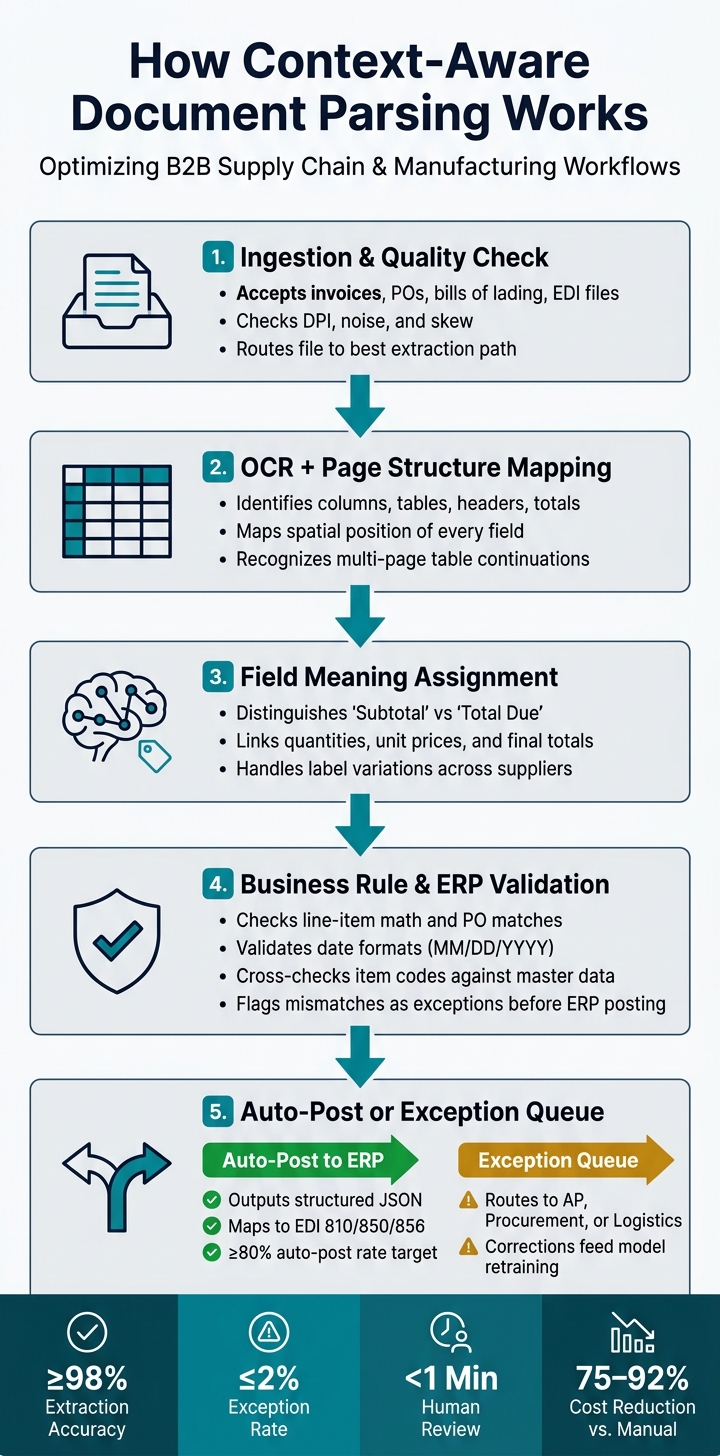
How Context-Aware Document Parsing Works: From Ingestion to ERP Posting
A context-aware parsing pipeline handles a document step by step, turning it into structured, checked, ERP-ready data.
From Ingestion and OCR to Layout Analysis
The process starts as soon as a document comes in, whether that’s a vendor invoice, a scanned bill of lading, or a purchase order sent through EDI. Modern systems check scan quality, including DPI, noise, and skew, and then send each file down the best extraction path.
Next, the system maps the page structure. It identifies columns, tables, headers, line-item rows, totals, and signature blocks. That matters because the same number can mean very different things depending on where it appears. A figure in the bottom-right corner of an invoice does not mean the same thing as that figure inside a line-item row.
Semantic Modeling and Business-Rule Validation
After the layout is mapped, semantic modeling gives each field meaning. Multimodal models use both position and meaning to identify fields. They can tell the difference between "Subtotal" and "Total Due" and connect quantities, unit prices, subtotals, and final totals.
The flow is pretty simple:
- First, the layout is mapped.
- Then, fields are interpreted by meaning and position.
- Finally, business rules check the output against ERP data and math checks.
If OCR reads a character the wrong way, the system can fix it when the surrounding values no longer add up. And if something still doesn’t pass those checks, it gets flagged as an exception instead of slipping through as bad data.
Field Extraction vs. Context-Aware Parsing: Side-by-Side Comparison
The gap becomes clear when document formats shift, tables run across multiple pages, or field labels change.
| Feature | OCR + rules | Context-Aware Parsing (AI) |
|---|---|---|
| Accuracy | High on clean, predictable layouts; low on complex or noisy documents | High accuracy on complex or degraded scans |
| Resilience to layout changes | Brittle - breaks when a supplier updates their template | Adapts to new formats without reconfiguration |
| Table handling | Requires fixed coordinates or templates | Reconstructs row-column relationships dynamically, including multi-page tables |
| Exception rates | High - frequent manual intervention required | Typically ≤2% exception rate |
| Data integrity | Captures raw text only | Validates extracted values against master data and mathematical rules |
| Setup effort | High - requires a custom template for every vendor | Low - pre-trained models work without vendor-specific templates |
For operations teams dealing with hundreds of suppliers and a mix of document formats, that last row matters just as much as accuracy. These results come from layout-aware transformers, multimodal models, and domain-specific segmentation, which the next section breaks down.
Models and Techniques Behind Document Understanding
Once parsing systems understand layout and business rules, AI agents and specific model choices have a big effect on how well they handle different document formats.
Layout-Aware Transformers and Multimodal Models
Text-only models miss something important: the page itself. They can read words, but they often lose the structure around those words.
Layout-aware transformers fix that by combining text with page position and visual signals. Models like DocFormerv2 use text, layout, and image cues to read forms and tables. That matters because documents aren't just blocks of text. They're spatial. A number in the top-right corner may mean one thing on an invoice and something else on a delivery receipt.
Multimodal embeddings add another step before extraction even starts. They can classify the document type first, separating invoices, bills of lading, and commercial equipment purchase orders. That classification then shapes what gets extracted and how. Put simply, if the system knows what kind of document it's looking at, it has a much better shot at pulling the right fields.
For multi-page and supplier-specific documents, segmentation and domain rules help keep results steady.
Chunking, Segmentation, and Domain Adaptation
Multi-page documents add another layer of difficulty. Fields may start on one page, continue on another, or appear in different spots depending on the supplier. That's where chunking and segmentation come in. Used with layout analysis, they help identify fields, tables, line items, and relationships across pages.
Domain adaptation handles the vocabulary side of the problem. It adds carrier- or vendor-specific rules so the model can interpret document terms the right way. For example, one carrier's "Document Charge" might map to a "cross-border processing fee". Same idea, different label.
Failure analysis helps clean up repeat mistakes. By grouping past extraction errors, teams can spot recurring patterns and use them to guide refinements. That's often where a lot of progress happens - not from swapping models, but from learning where the model keeps slipping.
Common Parsing Approaches Compared
These approaches mainly differ in how much variation they can handle without manual template work.
| Approach | Training Data Needs | Format Adaptability | Scan Tolerance | Implementation Complexity |
|---|---|---|---|---|
| OCR + Rules | High (per template) | Low | Moderate | High at scale |
| Layout-Aware Models | Moderate (pre-trained) | High | High | Moderate |
| Unified VLMs | Minimal (pre-trained) | Very high | High | High (resource-intensive) |
OCR + Rules can still work when you're dealing with a small set of fixed-format suppliers. But once the supplier base starts growing, template upkeep turns into a bottleneck. Every new layout adds more rule writing, more testing, and more edge cases.
Layout-aware models cut down that burden by adjusting to format variation through spatial and visual cues. Unified VLMs go a step further and can produce structured JSON or Markdown directly from document images. That makes them appealing for teams that want one system to handle many document types, even if the compute and implementation costs are higher.
Applying Context-Aware Parsing in Supply Chain Workflows
In the real world, context-aware parsing only proves itself when document data can make it through validation, normalization, and ERP posting without falling apart. That’s the stress test. Can the parser deal with mismatched quantities, mixed date formats, and unit conversions without turning routine work into a cleanup job?
Invoices, Purchase Orders, and Logistics Documents
Each document type puts pressure on different fields, so the system needs to know what matters in each case.
For invoices, the key fields usually include the invoice date in MM/DD/YYYY, line-item amounts in USD, and payment terms. Payment terms shouldn’t just sit there as plain text. The system needs to map them to ERP settings so they can be posted correctly. The same idea carries over to purchase orders, where date conflicts and unit mismatches often lead to posting errors.
With purchase orders, the parser has to tell the difference between a requested ship date and a required delivery date, even when a supplier confirmation uses mixed formatting. It also normalizes units to match the ERP standard while keeping the source unit on file for audit.
Logistics documents - bills of lading, warehouse receipts, and delivery notes - bring a different set of fields into play. These often include carrier booking numbers, container numbers formatted as ABCU1234567, and gross weights. The hard part is layout. These documents tend to be dense, abbreviated, and different from one carrier to the next, so the system has to use both spatial position and text clues to map shortened labels to the right fields.
When documents come in from international suppliers, normalization matters just as much as extraction. A date written as 29/07/2026 and a weight listed in kilograms both need to be converted into the format the ERP expects before posting. At the same time, the original values should stay preserved in an audit field.
ERP Integration and Exception Handling
Once the fields are normalized, they can be posted into ERP objects. After validation, the system outputs structured JSON for ERP posting. If the ERP expects structured messages, that JSON can be translated into EDI 810, 850, or 856.
| Parsed Field | ERP Schema Target | Validation Rule |
|---|---|---|
| Supplier Name | Vendor_ID | Match against vendor master |
| Invoice Date | Posting_Date | Validate MM/DD/YYYY; flag if outside open period |
| PO Total | Invoice_Total | Verify against sum of line items |
| Quantity | Qty_Ordered | Flag if variance exceeds tolerance |
| Item Code | Item_Master_ID | Cross-check with internal catalog |
Of course, not every document posts cleanly. That’s where exception queues come in. They catch issues like quantity variances, missing line items, unrecognized supplier IDs, or dates outside an open posting period.
Those exceptions then get labeled and routed to the right team:
- AP handles invoice mismatches
- Procurement reviews PO discrepancies
- Logistics fixes shipment data gaps
Smaller variances can be auto-approved. Bigger gaps need a person to step in and make the call. Each resolution is logged, and that history feeds back into model refinement over time.
How Leverage AI Fits Into This Workflow
A good example is automated purchase order tracking. Leverage AI ingests POs and supplier replies, pulls out fields like item codes, quantities, and promised ship dates, syncs that data to the connected ERP, sends automated follow-ups when confirmations are overdue, parses the replies, and tracks supplier performance. That gives procurement teams an up-to-date view of on-time delivery rates, lead time trends, and exception patterns by supplier.
Deployment, Measurement, and Next Steps
Once parsed data starts flowing into your ERP and exception queues, the work shifts. Now you need to track drift, manual effort, and straight-through processing.
How to Measure Performance and Improve Over Time
After go-live, track accuracy, exception rate, review time, and auto-post rate.
| Metric | Target Threshold | Review Frequency |
|---|---|---|
| Extraction Accuracy | ≥ 98% | Weekly |
| Exception Rate | ≤ 2% | Monthly |
| Human Review Time | < 1 min per document | Quarterly |
| Auto-post Rate | ≥ 80% | Monthly |
Stick with the same exception categories already used for invoices, POs, and logistics documents. That keeps reporting clean and makes it easier to spot what’s changing over time. More importantly, these metrics tell you if the system is cutting manual work or just moving that work into a review queue.
The longer-term test is layout drift. A system might look good on familiar formats and still break when a supplier changes a template. That’s a red flag. If it can’t handle changed layouts, it isn’t ready for production.
The fix is a clear feedback loop. Capture reviewer corrections and label the exact failure modes, such as “split tables” or “wrong vendor mapping,” so tuning has better signal.
Advanced Parsing vs. OCR-Plus-Rules: Pros and Cons
Deployment makes the gap between legacy rules and context-aware parsing pretty obvious. One relies on static templates. The other adjusts as layouts change.
At scale, OCR-plus-rules tends to create two big problems:
- Template upkeep
- Review bottlenecks
Context-aware parsing cuts both by handling new layouts better and learning from corrections.
The cost difference can be hard to ignore. Switching from manual workflows to context-aware parsing can reduce document processing costs by 75% to 92%. At the same time, poor data quality - the kind legacy OCR can produce at scale - costs organizations an average of $12.9 million per year.
Key Takeaways for Operations Leaders
Use the metrics and failure patterns above to decide where to tighten schemas, retrain models, or expand automation.
Set data schemas early. Define failure modes before go-live. Show visual grounding so reviewers can verify what the system saw. Then move in a simple order: standardize, validate, ground visually, and automate ERP posting.
Leverage AI can connect extraction to ERP workflows, supplier follow-ups, and performance tracking - turning accurate parsing into faster cycle times and less manual review.
FAQs
How is context-aware parsing different from OCR?
OCR turns printed or handwritten content into machine-readable text. But it doesn’t understand meaning or the relationships between pieces of information. In practice, it often reads a document like one long, flat stream of text. That’s where things can go sideways with complex layouts, tables, or messy formatting.
Context-aware parsing begins with OCR and then goes a step further. It uses AI to read the document’s structure and infer intent. Instead of just pulling text off the page, it looks at layout, nearby text, and metadata to extract accurate, structured data without depending on rigid templates.
What documents benefit most from context-aware parsing?
Context-aware parsing works best when documents don't follow a neat pattern.
It's a strong fit for files with mixed structures, inconsistent layouts, or data that's tied together in more than one way. That includes purchase orders, invoices, order confirmations, and shipping notices in formats like emails, PDFs, scans, or images.
It also works well for legal contracts, clinical records, and financial statements, where meaning, context, and hierarchy play a big role in getting automation right.
How do you measure parsing success after go-live?
Measure parsing success after go-live with a small set of core KPIs: extraction accuracy (target 98% or higher), exception rate (2% or less), touchless rate (75%–85%), and total processing time per document.
Check these numbers on a regular basis. Then feed human corrections back into the system so you can catch model drift early and keep your operational ROI on track.
Leverage AI offers built-in analytics and dashboards for real-time monitoring.