---
title: "PO Tracking: Automated Supplier Follow-Up"
description: Cut buyer inbox work and surface delivery risk using line-level PO data, fixed triggers, structured replies, AI parsing, and ERP write-back.
image: https://assets.seobotai.com/cdn-cgi/image/quality=75,w=1536,h=1024/tryleverage.ai/6a9f5238180d85018c31b691-1788829739062.jpg
---
[Skip to main content](https://tryleverage.ai/blog/automated-supplier-follow-up-po-tracking#main-content)
[   ](https://tryleverage.ai)
- Show submenu for Platform Platform
- [CONNECT: Integrations](https://tryleverage.ai/integrations)
- [PARSE: Document Parsing](https://tryleverage.ai/document-parsing)
- [MEASURE: Supplier Performance](https://tryleverage.ai/supplier-performance)
- [PAY: Trade Finance](https://tryleverage.ai/payments)
- [ENGAGE: PO Automation](https://tryleverage.ai/purchase-order-automation)
- [TRACK: Shipments](https://tryleverage.ai/shipment-tracking)
- [COPILOT: AI Agents](https://tryleverage.ai/artificial-intelligence)
- Show submenu for Case Studies Case Studies
- [Manufacturing](https://tryleverage.ai/case-study-manufacturing)
- [Distribution](https://tryleverage.ai/case-study-distribution)
- [Pharma & Biotechnology](https://tryleverage.ai/case-study-pharma-biotechnology)
- [Food Production](https://tryleverage.ai/case-study-food-production)
- [Furniture](https://tryleverage.ai/case-study-furniture)
- [Supplements](https://tryleverage.ai/case-study-supplements-manufacturing)
- [Packaging](https://tryleverage.ai/case-study-packaging-manufacturing)
- [Automotive Parts Distributor](https://tryleverage.ai/case-study-auto-parts-distributor)
- [Commercial Equipment](https://tryleverage.ai/case-study-commercial-equipment)
- [Wood Processing Equipment](https://tryleverage.ai/case-study-wood-processing-equipment)
- Show submenu for Company Company
- [Our Story](https://tryleverage.ai/our-story)
- [Podcast](https://tryleverage.ai/podcast)
- [Blog](https://tryleverage.ai/blog)
- [Careers](https://tryleverage.ai/careers)
- [Partners](https://tryleverage.ai/partners)
- [Contact Us](https://tryleverage.ai/contact)
Open main navigation
Close main navigation
- Show submenu for Platform Platform
- Platform
- [CONNECT: Integrations](https://tryleverage.ai/integrations)
- [PARSE: Document Parsing](https://tryleverage.ai/document-parsing)
- [MEASURE: Supplier Performance](https://tryleverage.ai/supplier-performance)
- [PAY: Trade Finance](https://tryleverage.ai/payments)
- [ENGAGE: PO Automation](https://tryleverage.ai/purchase-order-automation)
- [TRACK: Shipments](https://tryleverage.ai/shipment-tracking)
- [COPILOT: AI Agents](https://tryleverage.ai/artificial-intelligence)
- Show submenu for Case Studies Case Studies
- Case Studies
- [Manufacturing](https://tryleverage.ai/case-study-manufacturing)
- [Distribution](https://tryleverage.ai/case-study-distribution)
- [Pharma & Biotechnology](https://tryleverage.ai/case-study-pharma-biotechnology)
- [Food Production](https://tryleverage.ai/case-study-food-production)
- [Furniture](https://tryleverage.ai/case-study-furniture)
- [Supplements](https://tryleverage.ai/case-study-supplements-manufacturing)
- [Packaging](https://tryleverage.ai/case-study-packaging-manufacturing)
- [Automotive Parts Distributor](https://tryleverage.ai/case-study-auto-parts-distributor)
- [Commercial Equipment](https://tryleverage.ai/case-study-commercial-equipment)
- [Wood Processing Equipment](https://tryleverage.ai/case-study-wood-processing-equipment)
- Show submenu for Company Company
- Company
- [Our Story](https://tryleverage.ai/our-story)
- [Podcast](https://tryleverage.ai/podcast)
- [Blog](https://tryleverage.ai/blog)
- [Careers](https://tryleverage.ai/careers)
- [Partners](https://tryleverage.ai/partners)
- [Contact Us](https://tryleverage.ai/contact)
- [Login](https://app.lvrg.ai/signin)
[See Demo](https://tryleverage.ai/request-a-demo)
[Login](https://app.lvrg.ai/signin)
[See Demo](https://tryleverage.ai/request-a-demo)
# Automated Supplier Follow-Up for PO Tracking
%202%20(1).png?width=40&height=40&name=20250501_1415_Professional%20LinkedIn%20Update_remix_01jt6gxkjmekavnvzsewk61z9w%20(1)%202%20(1).png)
By [Anna Martinez](https://tryleverage.ai/blog/author/anna-martinez) · Sep 29, 2026, 8:31:33 AM
**Most PO follow-up work should not live in a buyer’s inbox.** If your team is still sending one-off reminder emails, you are likely spending **5–10 hours per buyer each week**, or about **$225–$600 weekly** at **$45–$60/hour**, just to chase updates.
**TL;DR:** I’d set this up in four parts: clean line-level PO data, fixed follow-up rules, standard supplier reply formats, and ERP write-back with status history. Then I’d track a small set of numbers - *reply rate, median reply time, on-time delivery, auto-update rate, and risk flags* - to see if the process is cutting manual work and showing delays earlier.
Here’s the short version:
- **Start with PO line data, not just header data**
- **Use clear trigger rules based on business days**
- **Ask suppliers to confirm, revise, or flag risk**
- **Write replies back to the ERP within 24 hours**
- **Use AI for messy replies and exception routing**
- **Review supplier and workflow performance every week and month**
If I had to boil the whole article down to one point, it would be this: *automation works when the data is clean, the rules are fixed, and every supplier reply lands on the right PO line without manual reentry.*
Manual follow-up looks simple, but it creates two problems at once. First, buyers lose time. Second, teams end up planning from old promise dates. That is where missed receipts, bad receiving plans, and late customer commitments start.
The article’s core advice is practical. Before turning on any workflow, I’d make sure each open PO line has the right fields: **PO number, line ID, item, quantity, unit of measure, required date, latest confirmed date, ship-to code, buyer owner, and supplier contact email**. Without that, automated messages either fail or create more noise.
Next, I’d define exact trigger rules. For example:
- **2 business days after PO issue with no acknowledgment** → send reminder
- **5 business days before promised date with no update** → ask for ship plan
- **1 business day after promised date with no receipt** → request new ETA
- **Any supplier date or quantity change** → route to buyer approval before ERP update
That matters because vague rules like “follow up when late” do not work in a system. *Specific timing, field checks, and escalation paths do.*
I’d also avoid open-ended supplier emails. The article makes a strong case for structured messages that show the PO line details and ask the supplier to do one of three things:
1. **Confirm**
2. **Revise**
3. **Flag an issue**
That one change makes replies easier to match, log, and post back to the ERP. It also creates a status trail with the **old value, new value, source, timestamp, and notes**, which helps with planning and root-cause review later.
Where AI fits in is not magic. It is there to read messy supplier replies, pull out dates and quantities, match them to the right line, and send only unclear cases to a buyer. That is most useful when PO volume is high and inbox review becomes the bottleneck.
To judge whether the setup is working, I’d watch five numbers:
- **Supplier response rate**
- **Median response time**
- **On-time delivery rate**
- **POs updated without buyer touch**
- **Orders escalated for risk**
If those numbers move in the right direction, the workflow is doing its job. If not, the weak spot is usually one of three things: bad master data, loose reply formatting, or poor write-back rules.
So the article is not just saying “automate follow-up.” It is saying: **build a simple system that updates PO truth faster, cuts manual chasing, and shows delay risk before the due date slips past you.**
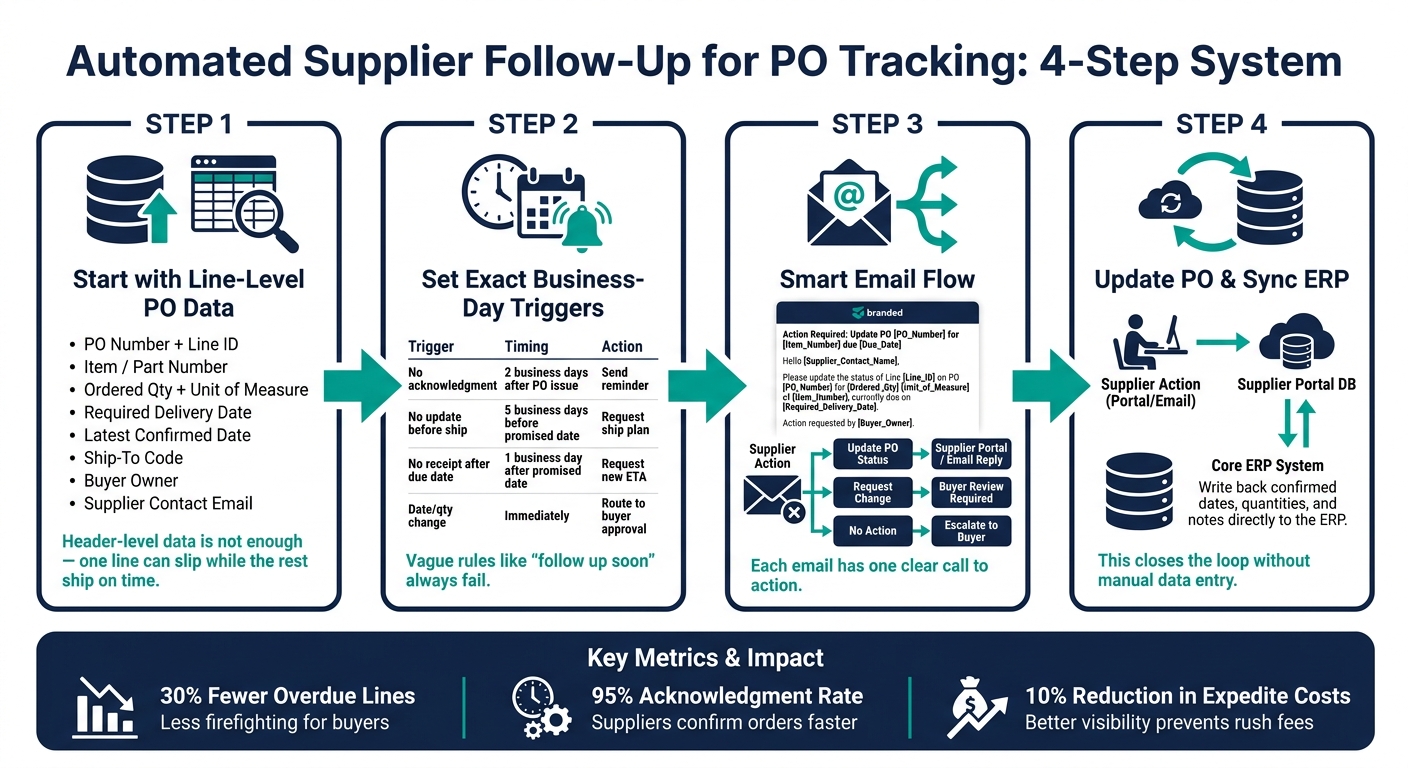
Automated PO Follow-Up Workflow: 4-Step System for Supplier Tracking
## How to Automate Supplier Follow-Up on Purchase Orders
###### sbb-itb-b077dd9
## 1. Define Your PO Data and Workflow Rules Before You Automate
[Automated follow-up](https://tryleverage.ai/manufacturing) only works when every open PO line points to the same ERP record. Before you switch anything on, decide which ERP fields are the **official source** for each open PO line. If buyers, logistics, and planning each rely on a different record, automation just spreads old data faster.
### The Minimum Data Required on Each PO Line
Header-level data isn't enough for dependable follow-up. You need **line-level detail** because one line on a PO can slip while the rest ship on time. If you only track the header, a late item can hide inside an otherwise on-time PO.
That’s why buyers end up double-checking details over email. And once that happens, automation starts to fall apart.
At a minimum, each PO line should include these fields before launch:
| Field | Why It Matters |
| --- | --- |
| PO number + line ID | Ties each follow-up and reply to a specific record |
| Item/part number | Shows exactly what’s being tracked |
| Ordered quantity + unit of measure | Confirms partial shipments and spots quantity changes |
| Required delivery date (MM/DD/YYYY) | Sets the planning deadline your team is working toward |
| Latest confirmed date | Shows the supplier’s latest commitment and triggers most follow-up rules |
| Ship-to code | Sends receipts to the right warehouse |
| Buyer owner | Shows who should get escalation alerts |
| Supplier contact email | Makes sure automated messages reach the right person |
Without a valid supplier contact on each line, automated follow-ups can’t reach the right person. They either stall out or land in the wrong inbox.
### How to Set Trigger Conditions for Follow-Ups and Escalations
Once your PO data is clean, the next step is [setting triggers](https://tryleverage.ai/case-study-distribution) that catch delay risk early and route follow-ups on their own. A rule like “follow up if late” sounds fine in a meeting, but it doesn’t work in workflow logic. You need exact conditions tied to field values and business-day timing.
A good starting point is four core triggers. Each one should connect to a timing rule, an automated action, and a clear escalation path:
| Trigger | Timing Rule | Automated Action | Escalation |
| --- | --- | --- | --- |
| 2 business days after PO issue, no acknowledgment | 2 business days from PO send | Send a reminder requesting line-level acknowledgment | Notify buyer and category manager at 4 business days |
| 5 business days before promised date, no update | 5 business days before promised date | Pre-ship check: confirm shipping plan and carrier | Flag line as "At risk" and alert planning |
| 1 business day after promised date, no receipt | 1 business day after promised date | Request updated ETA | Escalate to procurement leadership at 3 days late |
| Supplier requests a date or quantity change | Immediately upon receipt | Route to buyer for approval and pause the ERP update until the buyer approves | If production-critical, notify planning and sales |
U.S. holidays should be excluded. Otherwise, the workflow fires when nobody is working. Use business-day logic, and set tighter windows for production-critical parts. Lower-value MRO items can run on slower summary cycles.
Putting these rules into a table before you touch any workflow tool does something useful: it forces the hard conversations early. Who approves a date change? What counts as “production-critical”? How much date movement is okay before buyer approval is needed?
That prep work is what makes the automation auditable and consistent instead of just faster.
Once the rules are in place, standardize the message fields and reply format so each response can update the ERP cleanly.
## 2. Build Standardized Supplier Messages and Response Capture
Once your trigger rules are set, the next step is simple: make every follow-up message easy to act on.
Vague check-ins put the burden on suppliers to figure out what you mean. And when they guess, the reply is often just as fuzzy. A structured message fixes that. It also makes later automation much easier to run.
### Write Templates That Ask for Specific PO Confirmations
Each automated follow-up should include enough detail for the supplier to respond right away, without digging through old emails or missing purchase order data.
That starts with the subject line. It should include the PO reference and delivery date. For example:
> Action Required: Confirm PO 4501234 / Line 003 by 10/15/2026.
The aim is simple: cut back-and-forth and speed up PO confirmation.
In the email body, auto-fill the main line details from the ERP:
- **PO number + line ID**: PO 4501234 / Line 003
- **Item/SKU**: ABC-123
- **Ordered quantity / unit of measure**: 1,200 pcs
- **Required dock date**: 10/15/2026
- **Current promised date**: 10/10/2026
- **Ship-to location**: Dallas DC
Right after that, ask the supplier to choose one of three reply paths:
- **Confirm** the date and quantity as-is
- **Revise** with a new date and/or quantity, plus a brief reason
- **Flag an issue** if delivery is at risk, including an expected recovery date
Also set a firm response window: reply within **2 business days**.
### Capture Supplier Replies Back to the ERP with Status History
A supplier reply should post back to the correct ERP line automatically. It shouldn't sit in someone's inbox waiting for manual entry.
The goal is a setup where the supplier's confirmation lands on the right PO line with a timestamp, with **no manual reentry required**.
Each update should be logged as a new status event that includes the old value, new value, source, timestamp, and notes. That history gives teams a clean record to work from. It helps them spot repeat slippage early, before the due date slips by.
It also gives planners better data for promise-date planning and makes root-cause analysis much easier after a missed delivery. In plain English, you're not just tracking replies. You're building a record people can trust when something goes off track.
Standardized templates beat ad hoc email in four clear ways:
| Capability | Standardized Templates | Ad Hoc Emails |
| --- | --- | --- |
| **Response clarity** | Supplier replies with exact date, quantity, and status code | Vague replies like "shipping soon" with no line-level detail |
| **ERP matching** | Unique reference ID in the subject line enables automatic matching | Manual search required to tie reply to the correct PO line |
| **Audit trail** | Every status event logged with timestamp and source | Scattered across individual inboxes; hard to reconstruct |
| **Manual data entry** | Structured replies parsed and posted automatically | Buyer copies dates and quantities into ERP by hand |
Standardized templates don't just save time. They make the data reliable enough to use without stopping to double-check every line. And when the data is clean, AI has a much easier job sorting exceptions and pushing risk to the right people faster.
## 3. Add AI-Powered Follow-Up and Visibility to Scale the Process
Clean templates and structured replies take you pretty far. But once PO volume climbs past what a small team can watch day to day, rules alone start to crack. Reminders may still send on schedule, but someone still has to read each reply, figure out what it means, and decide whether the ERP should change.
### Where AI Improves Follow-Up Accuracy and Speed
Once templates and status capture are in place, AI steps in for the replies that still come back in plain language or with only part of the story.
Supplier replies are often messy and unstructured. AI pulls out the PO number, date, quantity, and partial-ship details, then sends only the outliers to buyers. Say a vendor confirms **2,000 units on 10/15 instead of 10/01**, with the rest shipping later. AI can parse that reply, match each detail to the right ERP line, cut review time, and process replies in real time.
Speed is only part of it. AI also spots risk in ways rule-based systems usually miss. If a supplier has pushed the promised date back several times on the same PO line, the system can flag that line as high risk, even if the newest date still looks fine on paper. If a reply is vague or non-committal, AI can send it to an exception queue for buyer follow-up instead of marking it as confirmed. And if an acknowledgement never comes in, the system can trigger automatic reminders.
### How [Leverage AI](https://tryleverage.ai/) Fits Into an ERP-Based PO Tracking Workflow
Leverage AI connects to your ERP through APIs or middleware, which keeps PO and supplier data synced. When a PO is created or updated, Leverage AI pulls the key fields - supplier, line items, requested dates, and ship-to location - and handles follow-up from there. Outbound messages go out on schedule. Inbound replies are parsed, matched to the right PO lines, and written back to the correct PO line.
This starts to matter a lot when reply volume turns manual review into the bottleneck. Dashboards rank open orders by delay risk, so buyers can jump on the highest-risk lines first.
The payoff shows up most clearly at scale. For example, [industrial manufacturers](https://tryleverage.ai/case-study-manufacturing) use these systems to maintain visibility across thousands of open lines. Teams handling thousands of POs need automated parsing and exception routing to keep pace with incoming replies without adding headcount.
Once AI is taking care of the volume, track [data-driven supplier performance metrics](https://tryleverage.ai/supplier-performance) to tighten the workflow:
- Response time
- Exception rate
- Manual touches
## 4. Monitor Supplier Performance and Refine the Workflow Over Time
Once your rules, templates, and AI are live, the next step is simple: **check whether the workflow is doing the job**.
Automatic follow-ups can save time on paper. But the only way to know if they’re helping is to measure what happens next. Are suppliers replying more often? Are buyers doing less manual work? Are delays showing up early enough to act on them?
You’ll also want to track whether open PO lines are closing on time, updating on their own, and flagging risk before a late shipment turns into a bigger problem.
### Which Metrics to Track: Response, Delivery, and Manual Work
Five metrics give you a clear view of automated PO follow-up performance.
- **Supplier response rate:** the percentage of follow-ups answered within the SLA window. This shows SLA compliance.
- **Median response time:** the midpoint of reply times. This shows speed and is less skewed by outliers than an average.
- **On-time delivery rate (OTD):** the percentage of PO lines received on or before the supplier-confirmed date.
- **Percentage of POs updated without buyer intervention:** how often the workflow completes the full loop without manual entry. This is a control metric for workflow completion, not just a proxy for labor saved.
- **Orders escalated for risk:** how often the workflow flags delay risk.
That last metric only works if your risk rules are clear. Set thresholds based on lateness, supplier criticality, or order value so escalations stay tied to cases that matter.
Used together, these metrics help you spot the difference between a supplier issue and a workflow issue. If response rates are weak, the supplier may be the problem. If replies come in but records still aren’t updating, the workflow may be breaking in the middle.
| KPI | Definition | Data Source | Review Cadence | Action If Off-Track |
| --- | --- | --- | --- | --- |
| Supplier Response Rate | % of follow-ups replied to within SLA window | Automation log | Weekly | Revise message templates or shorten response window |
| Median Response Time | Middle value of all reply times in the period | Automation platform | Monthly | Review supplier communication process |
| On-Time Delivery Rate (OTD) | % of PO lines received on or before supplier-confirmed date | ERP receiving records | Monthly | Review promise-date quality or escalation timing |
| POs Updated Without Buyer Touch | % of POs where system handled full follow-up loop | Workflow logs | Monthly | Improve reply capture or [ERP write-back rules](https://blog.tryleverage.ai/blog/leverage-sap-erp-solutions) |
| Orders Escalated for Risk | Count of POs flagged for delay risk | ERP / automation platform | Weekly | Adjust escalation thresholds or escalation timing |
### Use Scorecards and Exception Queues to Prioritize Supplier Follow-Up
Scorecards help you see supplier trends over 30, 60, or 90 days. They show patterns that can slip past you in day-to-day work.
Exception queues do a different job. They help teams act today. A good queue ranks open cases, assigns an owner, and separates supplier delays from internal blockers. In plain English, it should show **what needs action now, who owns it, and whether the delay sits outside your team or inside it**.
A steady review rhythm keeps the workflow from going stale. Use monthly trend reviews to look at movement over time, and weekly escalation triage to keep open issues from dragging on. Compare results with the prior period, find the suppliers driving the most exceptions, and change only one variable at a time, such as a template, a threshold, or an escalation timing rule. Then check the next cycle to see what changed.
## Conclusion: Start with Clear Triggers, Structured Messages, and Measurable Results
Once the workflow is live, the focus moves from setup to clean execution. That starts with clean PO records. At the line level, item, quantity, date, ship-to, and status data need to match across the ERP. If those fields are missing or inconsistent, reminders may go to the wrong contact, go out too early, or fail to flag delay risk.
With clean data in place, the workflow can stay simple: set triggers, standardize supplier replies, and write responses back to the ERP. Automated monitoring can cut follow-up labor by **70%–80%** and improve on-time delivery visibility. Automated supplier communication can also improve on-time delivery performance by **22%**.
AI helps the process handle more volume without adding manual work. It can parse unstructured replies, surface exceptions, and sort high-risk POs for review first. [Leverage AI](https://tryleverage.ai) is built for this kind of ERP-based workflow, helping teams automate outreach and keep PO status current without manual chasing.
Once automation is in place, measurement tells you if it's doing the job. Track results last:
- Acknowledgment rate
- Automatic update rate
- Late deliveries caught before the due date
The aim is simple: faster visibility into delays and cleaner PO control, built on clear rules, structured messages, and a workflow that gets better with each cycle.
## FAQs
### How do I start with messy PO data?
Start with **data hygiene**. Get your supplier records, contact details, and purchase order fields lined up in your ERP. Then make time to clean things up on a regular basis: remove duplicates, check key details, and replace stale contact information.
For day-to-day consistency, standardize units of measure, item codes, and supplier names. AI can pull data from emails and PDFs, clean it up, and update your ERP automatically. That means less manual entry and fewer errors later on.
### Which supplier replies should update the ERP automatically?
Supplier replies with **PO status updates** should flow straight into the ERP automatically. That includes:
- acknowledgments or confirmations, including revised promise, ship, or delivery dates
- shipped or ASN details, such as tracking IDs and ETAs
- other extracted changes matched to the correct PO line items
If a reply shows a missing acknowledgment, the system should trigger a reminder or escalation workflow instead. That way, PO statuses stay in sync in the ERP without manual re-entry.
### How long does it take to see results from PO follow-up automation?
Teams often start seeing results fast. A full rollout usually takes **2 to 4 weeks**, and many pilots can get off the ground as early as **week 2**.
You also don’t have to wait long to see the numbers move. During deployment, teams often begin seeing clear gains in accuracy and efficiency. Within **60 days**, many cut manual follow-up time by **50%+**, and ROI is often reached within **3 months**.
## Related Articles
### See Leverage in Action
Stop chasing suppliers by email. Get real-time PO tracking and delivery visibility for your entire supply chain.
[Request a Demo](https://tryleverage.ai/request-a-demo)
#### Works with your ERP
Epicor, Infor, SAP, NetSuite, Microsoft Dynamics, and more. No EDI or supplier portal required.
[](https://tryleverage.ai)
Leverage AI delivers an end-to-end supply chain visibility platform powered by artificial intelligence that enables teams to ensure on-time delivery, in-full completion, within-budget costs, and high-quality standards.
Copyright © 2026 LVRG, Inc.
- Platform
- [CONNECT: Integrations](https://tryleverage.ai/integrations)
- [PARSE: Document Parsing](https://tryleverage.ai/document-parsing)
- [MEASURE: Supplier Performance](https://tryleverage.ai/supplier-performance)
- [PAY: Trade Finance](https://tryleverage.ai/payments)
- [ENGAGE: PO Automation](https://tryleverage.ai/purchase-order-automation)
- [TRACK: Shipments](https://tryleverage.ai/shipment-tracking)
- [COPILOT: AI Agents](https://tryleverage.ai/artificial-intelligence)
- Case Studies
- [Manufacturing](https://tryleverage.ai/case-study-manufacturing)
- [Distribution](https://tryleverage.ai/case-study-distribution)
- [Pharma & Biotechnology](https://tryleverage.ai/case-study-pharma-biotechnology)
- [Food Production](https://tryleverage.ai/case-study-food-production)
- [Furniture](https://tryleverage.ai/case-study-furniture)
- [Supplements](https://tryleverage.ai/case-study-supplements-manufacturing)
- [Packaging](https://tryleverage.ai/case-study-packaging-manufacturing)
- [Automative Parts Distributor](https://tryleverage.ai/case-study-auto-parts-distributor)
- [Commercial Equipment](https://tryleverage.ai/case-study-commercial-equipment)
- [Wood Processing Equipment](https://tryleverage.ai/case-study-wood-processing-equipment)
- Resources
- [Security & Trust](https://tryleverage.ai/security)
- [Terms of Service](https://tryleverage.ai/terms)
- [Privacy Policy](https://tryleverage.ai/privacy)
- [Vulnerability Disclosure Policy](https://tryleverage.ai/vdp)
- Company
- [Our Story](https://tryleverage.ai/our-story)
- [Podcast](https://tryleverage.ai/podcast)
- [Blog](https://tryleverage.ai/blog)
- [Careers](https://tryleverage.ai/careers)
- [Partners](https://tryleverage.ai/partners)
- [Contact Us](https://tryleverage.ai/contact)
-
-
-
```json
{
"@context" : "https://schema.org",
"@type" : "BlogPosting",
"author" : {
"@type" : "Person",
"name" : "Anna Martinez",
"url" : "https://tryleverage.ai/blog/author/anna-martinez"
},
"dateModified" : "2026-09-29T12:31:33.340Z",
"datePublished" : "2026-09-29T12:31:33.000Z",
"headline" : "PO Tracking: Automated Supplier Follow-Up",
"image" : [ "https://assets.seobotai.com/cdn-cgi/image/quality=75,w=1536,h=1024/tryleverage.ai/6a9f5238180d85018c31b691-1788829739062.jpg" ],
"mainEntityOfPage" : {
"@id" : "https://tryleverage.ai/blog/automated-supplier-follow-up-po-tracking",
"@type" : "WebPage"
},
"publisher" : {
"@type" : "Organization",
"logo" : {
"@type" : "ImageObject",
"url" : "https://tryleverage.ai/hubfs/Logo%20+%20Name%20Dark.png"
},
"name" : "Leverage AI"
}
}
```
```json
{
"@context" : "https://schema.org",
"@type" : "FAQPage",
"mainEntity" : [ {
"@type" : "Question",
"acceptedAnswer" : {
"@type" : "Answer",
"text" : "Start with data hygiene. Get your supplier records, contact details, and purchase order fields lined up in your ERP. Then make time to clean things up on a regular basis: remove duplicates, check key details, and replace stale contact information. For day-to-day consistency, standardize units of measure, item codes, and supplier names. AI can pull data from emails and PDFs, clean it up, and update your ERP automatically. That means less manual entry and fewer errors later on."
},
"name" : "How do I start with messy PO data?"
}, {
"@type" : "Question",
"acceptedAnswer" : {
"@type" : "Answer",
"text" : "Supplier replies with PO status updates should flow straight into the ERP automatically. That includes: acknowledgments or confirmations, including revised promise, ship, or delivery dates. shipped or ASN details, such as tracking IDs and ETAs. other extracted changes matched to the correct PO line items. If a reply shows a missing acknowledgment, the system should trigger a reminder or escalation workflow instead. That way, PO statuses stay in sync in the ERP without manual re-entry."
},
"name" : "Which supplier replies should update the ERP automatically?"
}, {
"@type" : "Question",
"acceptedAnswer" : {
"@type" : "Answer",
"text" : "Teams often start seeing results fast. A full rollout usually takes 2 to 4 weeks, and many pilots can get off the ground as early as week 2. You also don’t have to wait long to see the numbers move. During deployment, teams often begin seeing clear gains in accuracy and efficiency. Within 60 days, many cut manual follow-up time by 50%+, and ROI is often reached within 3 months."
},
"name" : "How long does it take to see results from PO follow-up automation?"
} ]
}
```